Twitch Chat Picker — Random Winner Generator for Twitch Giveaways
Running a Twitch giveaway and need a fair, live way to pick a winner from chat? The Twitch Chat Picker connects directly to your channel and pulls chatter usernames into a spin wheel in real time — so you can run “type a keyword to enter” giveaways and choose a winner on stream, with proof your community can trust.
No copy-pasting names. No scrolling back through chat. No accusations of picking favorites. Just connect your channel, watch entries populate live, and spin.
How to Pick a Random Winner from Twitch Chat
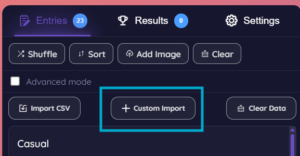
Step 1 — Open Custom Import
Click Custom Import in the wheel editor, then select Twitch from the import options.
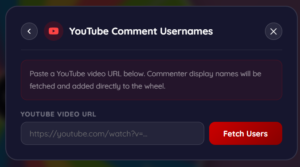
Step 2 — Enter your channel name
Type in your Twitch channel name (or paste your channel URL) to connect the picker to your live chat.
Step 3 — Keep the import open while you’re live
Unlike a one-time fetch, Twitch chat import stays open and listens in real time. As viewers type in chat — with your keyword if you’ve set one — their username populates into the entry list automatically, live, for as long as you leave the import running.
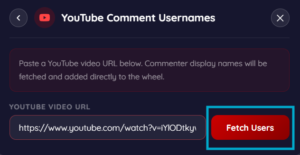
Step 4 — Review your growing list
Watch the entry count update live as chatters type your keyword. Let it run for as long as you want your giveaway window open — a few minutes, a full segment, or your entire stream.
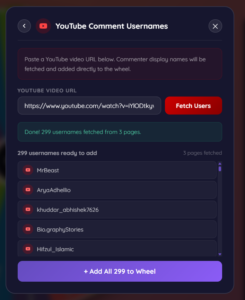
Step 5 — Add them to the wheel
Click Add All to Wheel to load every fetched username onto your spin wheel in one click.
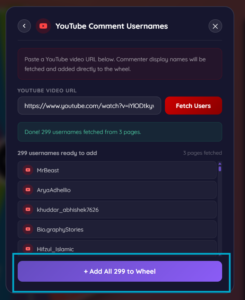
Step 6 — Spin and Announce your winner
When you’re ready to pick a winner, close the live import to lock in the entry list, click Add All to Wheel, then hit spin. The wheel selects a winner using cryptographically secure randomization — right there on stream, in front of your chat..
The entire process takes under a minute, even for videos with hundreds of comments.
Why the Keyword Filter Matters
A raw Twitch chat during a live stream is fast-moving and full of emotes, spam, and unrelated conversation. Without a filter, your wheel would fill up with everyone who happened to type anything at all — not just people actually entering your giveaway. The keyword filter solves this: tell your chat to type a specific word or phrase (like !raffle, giveaway, or a sponsor-related keyword) to enter, and only messages containing that exact text get pulled into the spinner. This keeps entries clean, intentional, and easy to explain to your audience in one sentence: “type the keyword to enter.”
Is This Twitch Chat Picker Free?
Yes. Completely free, no sign-up required, no limit on how many giveaways you run or how long you keep the live import open during a stream.
Customize Your Giveaway Wheel
Once your commenter names are loaded onto the wheel, you’re not limited to a plain spinner. The Spin Wheel Creator lets you fully customize the experience before you go live:
- Add your channel’s brand colors as the wheel theme
- Upload a custom logo or image to the center of the wheel
- Add spin sound effects and a winner announcement sound
- Customize the winner pop-up message — make it say something fun like “🎉 Congrats, you won!”
- Adjust spin duration and speed for more suspense
- Enable Mystery Entries mode to hide names until the wheel stops, building extra anticipation
A branded, polished wheel makes your giveaway feel more professional and memorable — explore the full set of customization features here.
Is the Winner Selection Truly Random and Fair?
Yes. Unlike many random pickers that rely on JavaScript’s standard Math.random() function — which is predictable and not cryptographically secure — this tool uses crypto.getRandomValues(), a high-security random number generator built into modern browsers. Every commenter pulled into the wheel has a genuinely equal chance of winning, and the result can’t be manipulated or predicted.
The best way to prove this to your audience is to do it live. Screen share the entire process during your stream or recording — paste the video URL, fetch the comments in real time, let viewers watch the full list load, and spin the wheel on camera. Because the names are pulled directly from your video and the spin happens in front of everyone, there’s no room to claim the result was pre-selected. This single step does more to build trust with your audience than any disclaimer ever could.
How Many Comments Can Be Imported?
The picker fetches commenter usernames in batches directly from YouTube, handling videos with anywhere from a handful of comments to several hundred in a single import — giving you a large, representative pool to spin from without long wait times.
Does This Work If Comments Are Disabled?
No. If the video creator has disabled comments, there’s nothing for the tool to fetch. Make sure comments are enabled on your giveaway video before announcing the contest.
Can I Pick Multiple Winners?
Yes. After spinning and selecting your first winner, use the “Remove Winner After Spin” option to take them off the wheel, then spin again to pick your next winner — repeat as many times as you need for multiple prizes.
Does This Work for YouTube Shorts?
Yes. Paste the URL of any public YouTube video or Short with comments enabled, and the picker will fetch commenter names the same way.
Who Uses a YouTube Comment Picker?
- YouTubers running subscriber milestones, merch giveaways, or “comment to win” contests
- Brands and marketers giving away products through YouTube campaigns
- Streamers selecting community challenge participants or shoutout winners
- Content creators randomly picking collab partners or featured fans from their audience
Why Use a Spin Wheel Instead of a Random Comment Generator?
A spin wheel adds visual proof and entertainment value that a simple “random number generator” can’t match. Your audience can watch the wheel spin in real time — on stream, in a video, or as a screen recording — building trust that the result wasn’t pre-selected. It also makes the moment more exciting for the winner and anyone watching.
Pick a Winner from Twitch Chat Too
Running a Twitch stream alongside your YouTube channel? Use the Twitch Chat Picker to connect to your live chat and pick a random winner from anyone who types a keyword — the same fair, fast process built for live streaming.
Frequently Asked Questions
How do I pick a random winner from Twitch chat?
Open Custom Import, select Twitch, enter your channel name, optionally set a keyword filter, and leave the import open while live. Chatters using the keyword populate the wheel automatically — close the import, add them to the wheel, and spin.
Do I need a keyword filter?
No, it’s optional. Without one, every chat message during the import window adds that user as an entry. With one set, only messages containing your exact keyword count.
Does the import work while I’m live, or do I need a saved chat log?
It works live. As long as the import is open, new chat messages populate the entry list in real time — there’s no need for a saved or exported chat log.
Can someone enter more than once?
Each unique username is added once, regardless of how many times they type the keyword — so spamming chat doesn’t increase anyone’s odds.
Is this Twitch chat picker free to use?
Yes, completely free with no sign-up required.
Can I use this for YouTube giveaways instead?
This tool is built specifically for Twitch live chat. Use the YouTube Comment Picker for giveaways run through YouTube video comments.